





 |
 |
[an error occurred while processing this directive]

 Support / Software Setup / IBIS Proxy / IE4.x Support / Software Setup / IBIS Proxy / IE4.x
IBIS Proxy Server Setup Guide
Windows 95 / 98 / ME
Internet Explorer 4.x Web Browsers
|
  |

Step 1:
select Internet Options from the View menu of Internet Explorer 4.x

Step 2:
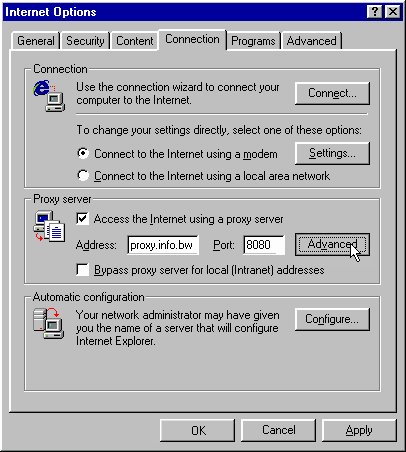
click on the Connections tab at the top of the Internet Options window
under Proxy server -
check the box labelled Access the Internet using a proxy server
in the text box labelled Address enter proxy.info.bw
in the text box labelled Port enter 8080
click on the Advanced button under Proxy server
Step 3:
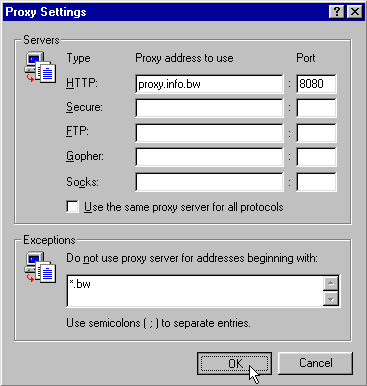
in the Proxy Settings window, under Servers -
in the top row labelled HTTP: -
ensure that Proxy address to use is proxy.info.bw
ensure that Port is 8080
ensure that all the other boxes under Servers are blank
under Exceptions -
in the text box labelled Do not use proxy server for... -
enter: *.bw;
click on the OK button at the bottom of the Proxy Settings window
Step 4:
click the OK button of the Internet Options window
your browser is now configured to use the IBIS Proxy Server
Problems? contact IBIS Technical Support for assistance:
e-mail support@usko.bw tel 318 444
|
|
|